OAPs having fun

February 20th, 2008 No comments

Parking Ticket (from iStockPhoto)From the Inbox:

“Working people frequently ask retired people what they do to make their days interesting.

Well, for example, the other day my wife and I went into town and went into a shop.

We were only in there for about 5 minutes but when we came out there was a warden writing out a parking ticket.

We went up to him and said, ‘Come on mate, how about giving an OAP a break?’

He ignored us and continued writing the ticket.

I called him a Nazi turd. He glared at me and started writing another ticket for having worn tyres.

So my wife called him a s**t-head. He finished the second ticket and put it on the windscreen with the first.

Then he started writing a third ticket. This went on for about 20 minutes. The more we abused him, the more tickets he wrote.

Personally, we didn’t care. We came into town by bus.

We try to have a little fun each day now that we’re retired, it’s important at our age.”

Categories: From the Inbox Tags:

NHS Online Waiting Time

February 15th, 2008 No comments

Nice to see that the NHS webservers reflect the real-life experience:

NHS Waiting
Categories: Uncategorized Tags: ,

Opening the USB cover on a Nokia 6300

February 12th, 2008 14 comments

I get so many search engine hits on my Nokia 6300 post where the search string is “How do I open the USB cover on Nokia 6300” that I thought I’d knock up a quick post on this.

To be perfectly honest, I’m quite curious as to why people are asking this in the first place. It’s not that difficult and if you’re not sure, I’m sure it’s in the manual. Anyway, if you’re still struggling read on…

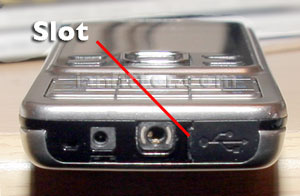
The USB socket is located on the bottom of the phone. To open the cover there is a slot to the left of the cover.

Nokia 6300 USB Cover

Insert your fingernail… (if you’ve got no nails or you’re a girly with nails you don’t want to break, a small flat bladed screwdriver is just as good)

Nokia 6300 USB Cover

and flick it towards you. The cover hinges down.

Open USB Cover

The cover is now open.

Categories: Uncategorized Tags: ,

Tape Storage vs Flash

February 12th, 2008 2 comments

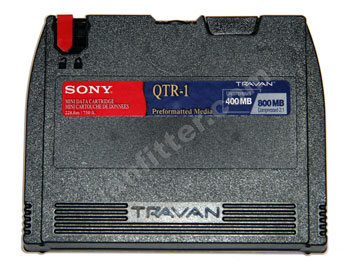
While clearing out some old gear, I found some of my old backup tape cartridges: DC2120 and TR400.

DC2120 Backup Cartridge
Travan TR400

66 DC2120 = 1 8GB SD CardWhat’s interesting is the storage capacity compared to today: 120MB and 400MB respectively. This was sufficient at the time to make a complete backup of my hard drive, but today would be very quickly filled with a few sets of digital photos. Compare this with an 8GB SD Flash card available for £16.99 today.

Categories: Uncategorized Tags:

Shock ingredient found in Eggs

February 11th, 2008 No comments

More crazy nanny labelling. Here is a box of eggs from Asda, remember eggs, got that? It is an egg box after all, so what else would you expect it to contain?

Egg Box

Inside is the obligatory nutritional information, including some less than useful allergy advice:

Nutritional Advice

Look closely – Yes, you read that correctly, it says “Contains egg”.

Contains Egg

Kind of reminds me of Wonko the Sane and the toothpicks in Hitch-hiker’s Guide to the Galaxy. If you’re that stupid that you need to be told that eggs contain eggs then you’re hardly likely to be able to read this on the box. What drives food producers to put this sort of blindingly obvious stuff on packaging? What stops them sitting back and saying “Wait a minute, this looks stupid”?

Categories: Uncategorized Tags:

BBC iPlayer hogs Upload Bandwidth

February 6th, 2008 4 comments

BBC iPlayerI tried BBC’s iPlayer last year, even though they still have it locked into Microsoft, but along with several others, could not get it working. All I got was meaningless error messages.

I tried again last month. This time it did give a more meaningful error “there is a problem with DRM in your Windows Media Player, click here for information on how to fix this”, except that the link only sent me to a non-responsive web server.

Last night I tried again, and the link worked, except that it didn’t take me to a solution page as expected, but to a general FAQ site on iPlayer. After several page-digging minutes later (you would expect this issue to be on the front page of the FAQ) I managed to find a page describing a solution. I tried it and, what do you know, it worked.

Not surprisingly, the problem was with Microsoft’s Media Player and the solution involved deleting some DRM system files, a visit to a Microsoft page to re-download DRM files and since we’re talking Microsoft, the obligatory reboot. Not the sort of hoops a user should have to jump through just to install a program.

I then downloaded a handful of BBC programmes without problem. (One of my daughters was especially happy to see a CBeebies programme among them.)
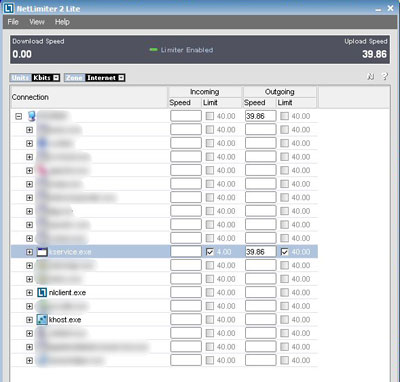
BBC iPlayer Swamps Upload (Red Line)After they had downloaded, I noticed the lights on the router were still flashing away. I checked my usage graphs and was surprised to see my upload was being completely swallowed up by the iPlayer software busy sharing the programmes with other users. (See red line on graph). Now before you say anything, I fully understood before I installed iPlayer that it was a peer-to-peer application, but I have downloaded linux distros before using a BitTorrent type client and have never seen my upload swamped like this. I can only assume that there are so many other users on iPlayer that any free upload seeds will be quickly picked up and hammered.

Now we come to the important missing part – there is no way to control this except the option not to share when the iPlayer download manager is closed. Any normal respectable BitTorrent client allows you to limit the number of connections and bandwidth used for upload. I presume this option is missing, because the BBC wants to maximise the number of connections available to other users, and therefore the quality of their experience.

I had similar problems installing Sky Anytime (same kontiki based engine underneath) so I thought I’d give that a go too. This time it installed OK (the BBC fix had obviously had its effect here too) and I downloaded a few programmes. However, once you shut Sky Anytime down, it does not stop sharing files with others and doesn’t give you the option to stop either, because the kontiki engine is installed as a service in Windows.

The only way to stop it, is to fire up Task Manager and kill ‘kservice.exe’ and ‘khost.exe’, however these will reappear if you reboot or restart the clients. I have since gone into services and changed ‘kservice.exe’ from Automatic to Manual start.

Apparently, uninstalling the clients will not uninstall the kontiki engine. Sky provide a downloadable program called Kclean to remove these (BBC used to, but have removed the link), but I don’t want to remove the clients, I just want software that doesn’t hog my connection.

The other missing configuration option is upload/download ratio. Normally on a Torrent client you can set the maximum ratio of upload to download, so for example for every 1MB downloaded, the client will not share that 1MB file more than twice. Both Sky and BBC clients are fixed at unlimited. That is just taking the P***.

I have found this useful piece of software from ‘the Technophile’, which monitors both iPlayer and Channel 4’s 4od player and kills the upload automatically when you close them. It doesn’t mention Sky, but it has a simple option to ‘Stop Sharing now’ which stops the kontiki service and therefore any player system relying on it. Highly recommended.

Update

Sky Tray IconIt does work with the Sky software. When you close the Sky software (from the tray icon) BeebAnd4Monitor spots this too and stops Kontiki.

Limiting iPlayer’s use of Bandwidth

Unfortunately, when iPlayer (or 4od/Sky Anytime) are running to allow you to watch programmes, they will be hammering your connection for what they can. I can recommend NetLimiter to restrict how much bandwidth you allow them to use.

NetLimiter
Categories: Uncategorized Tags: , , , ,

The Scottish Biscuits

January 30th, 2008 No comments

An elderly Scotsman lay dying in his bed.

While suffering the agonies of impending death, he suddenly smelled the aroma of his favourite biscuits wafting up the stairs. He gathered his remaining strength, and lifted himself from the bed. Leaning on the wall, he slowly made his way out of the bedroom, and with even greater effort, gripping the railing with both hands, he crawled downstairs.

With laboured breath, he leaned against the door-frame, gazing into the kitchen. Were it not for death’s agony, he would have thought himself already in heaven, for there, spread out upon waxed paper on the kitchen table were literally hundreds of his favourite biscuits, freshly baked.

Was it heaven? Or was it one final act of love from his devoted Scottish wife of sixty years, seeing to it that he left this world a happy man?

Mustering one great final effort, he threw himself towards the table, landing on his knees in crumpled posture. His aged and withered hand trembled towards a biscuit at the edge of the table, when it was suddenly smacked by his wife with a spatula…..

‘F**k off’ she said, ‘they’re for the funeral.’

Categories: From the Inbox Tags:

TomTom Release Home v2.2 (incl. Mac Version)

January 29th, 2008 2 comments

TomTom HomeAccording to YourNav.com, TomTom have released version 2.2 of Home and this release finally includes a Mac Version, just two days before the discounted map offer expires.

Categories: Uncategorized Tags:

Sky+ Series Link

January 22nd, 2008 No comments

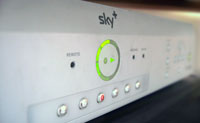
Sky PlusSky+ is one of those rare killer apps that has actually been well designed, however there are a couple of weaknesses in one of its most useful features – Series Link.

Sky+ Series LinkFirstly, the EPG (and hence series link) can only ‘see’ 7 days in advance. As often happens on the BBC, a programme gets postponed for a week. A prime example is Doctor Who making way for something like the Eurovision Song Contest on a Saturday night. Series Link cannot see two weeks ahead, so the link gets broken, and unless you spot this, you start to miss episodes.

Secondly, and more importantly, the series link information is provided by the individual broadcaster, so whether you get the correct information about the next episode is entirely down whether the broadcaster can be bothered to provide the information in the first place, and if it does, is actually competent to do it correctly (or at least understand what constitutes the next episode).

What is really annoying, is when the broadcaster does provide information, but it is wrong. In some ways this is worse than no information at all because you are trusting them to get it right. Again, the BBC seems to be the villain here for two distinct types of false information:

Often a new series is repeated a couple of times a week (especially on BBC Three), so for example Episode 1 could be shown on Sunday, Monday and Thursday. If I record Episode 1 on the Sunday and set Series Link, I expect the next recording to be Episode 2 on the following Sunday, but I often find that the Monday repeat is the next to be recorded. Why the hell would I want to record the same thing again? Obviously someone at the BBC doesn’t understand what series link is for and is just setting the next time that ‘programme name’ is shown. The problem here is that if I cancel the rogue recording, it breaks the link, so I need to set up the Sunday recording again.

The other situation I have seen is when the person setting the series link information ignores my wishes and seems to think that I would like to record a related programme rather than the one I asked for. Typically this would be a ‘behind the scenes’ programme (BBC Three) or another programme in the ‘season’ of programmes (BBC Four), rather than what I had asked for, namely the next episode of the same programme.

Categories: Uncategorized Tags: , ,

BT Broadband’s OTT SMTP Requirements

January 18th, 2008 No comments

BTSince the advent of spam, most ISPs have their SMTP servers set to only accept non-authenticated connections from computers on their own networks, and justifiably so. Some (mine included) offer the additional extremely useful option of making an authenticated connection (username and password) from outside their network to allow you to still use their SMTP server from anywhere in the world, without having to change settings to your host ISP’s SMTP server. In both cases, I am free to set the “From:” field to an email of my own choice, as I don’t use the email address provided by the ISP – I have my own domain name(s) for that, and want my outgoing emails to correctly show them instead.

Not so with BT Broadband. I was asked to assist a colleague who was complaining that he couldn’t send email on his BT Broadband connection. To cut a long story short, BT Broadband firstly require you to log in to the SMTP server using authentication, even if you are connected via their own network. Why?

However, that is still not enough if you don’t want to use the silly ‘surname9876@btinternet.com’ address they supply you with. You must also register every single ‘from’ address you wish to use via BT Yahoo first.

Makes me so glad I have a decent ISP.

Further information on how to set things up correctly on BT Broadband can be found from Paul Doherty and Peter Curtis.

Categories: Uncategorized Tags: , ,